
How do I search for a staff member of a company?
1. From the Main Menu click on Data Entry.
2. Click on the Companies tab.

3. Use the Quick Search on the right hand side
to locate a staff record by clicking on the Staff tab.
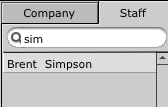
Type all or part of the name and then hit the Enter key on your keyboard.
4. A list of results will appear in the panel below. Click on one of these to be taken to the required record.